
How to Use the Meta Ad Library to Find Ads Worth Studying
The Meta Ad Library shows every ad currently running on Facebook, Instagram and Meta’s other apps. It is free, it needs no ad account, and it is the quickest way to see what your competitors are saying. Here is how to search it, what it does and does not tell you, and how to turn what you find into your own ads.
Updated
The short answer
The Meta Ad Library (facebook.com/ads/library) is Meta’s free, public search engine for ads. Choose a country and “All ads”, then search a keyword or an advertiser’s name to see their active ads on Facebook, Instagram, Messenger and the Audience Network, with the date each ad started running and its variations.
For ordinary ads it shows no spend or results, so you judge an ad by how long it has run and how many versions exist. For ads delivered in the EU or the UK it also shows reach and targeting, and keeps them for a year.
How to search the Meta Ad Library
Open the Ad Library
Go to facebook.com/ads/library. You do not need an ad account, and most searches work without logging in.
Pick a country and “All ads”
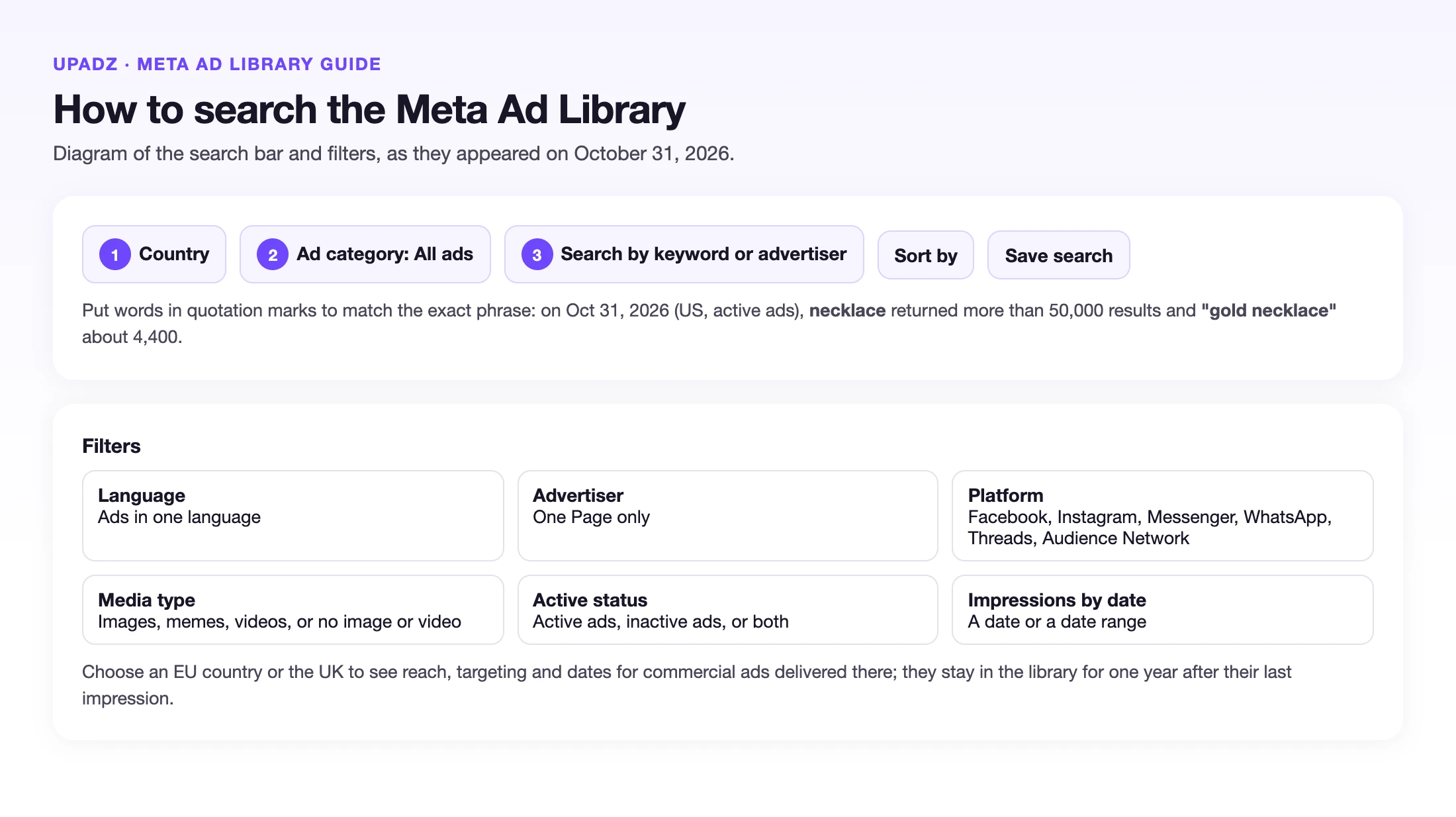
Choose the country you sell in, then “All ads” rather than the political category, so commercial ads are included.
Search a keyword or an advertiser
Type your product category (for example “vitamin C serum”) or a competitor’s Page name. Pick the advertiser from the suggestions to see only their ads.
Filter and open the details
Keep “Active ads” on, then use Filters for language, advertiser, platform, media type and the dates the ad was shown. Open an ad’s details to see its start date and, when there are several, its other versions.
The Meta Ad Library, explained
What the Meta Ad Library shows
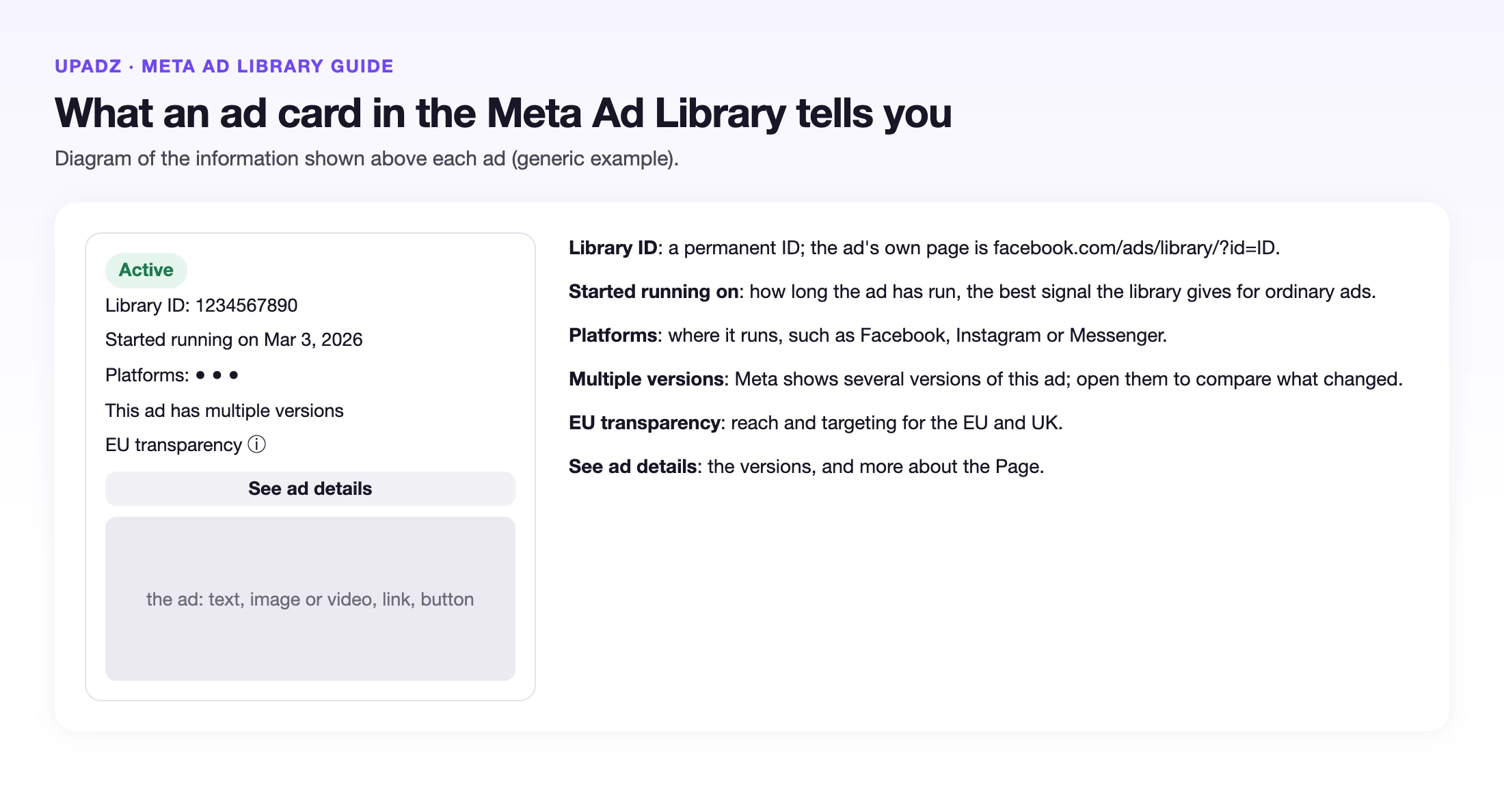
Every ad that is currently running across Meta’s apps, with its image or video, its text, its call to action, the platforms it runs on and the date it started. Branded content with a paid partnership label is included too.
Ads about social issues, elections or politics are covered in more detail, with their own disclaimers and a separate Ad Library Report that Meta lets you download by country.
What it does not show
For ordinary commercial ads shown in the US there is no spend, no reach, no click-through rate and no results, and only active ads appear. The library cannot prove that an ad works; it can only show signals worth investigating.
Ads delivered in the EU or the UK are the exception. For those, Meta shows the dates the ad ran, the advertiser's targeting choices (age, gender and location), the total reach and the reach by age and gender, and it keeps them for one year after their last impression. Pick an EU country or the UK in the country selector to see that data for brands that advertise there.
Meta Ad Library search tips
A search term matches the text of the ads and the names of the Pages that run them. Put words in quotation marks to match the exact phrase: on October 31, 2026, with the US and active ads selected, necklace returned more than 50,000 results and “gold necklace” about 4,400.
Use the filters to narrow it down: Language, Advertiser (one Page only), Platform (Facebook, Instagram, Messenger, WhatsApp, Threads, Audience Network), Media type (images, memes, videos, or no image or video), Active status, and Impressions by date. Save a search to come back to it, and open an ad by its Library ID at facebook.com/ads/library/?id= followed by the ID.
Can you download ads from the Meta Ad Library?
Meta lets you download Ad Library searches as data, through CSV exports, when you are logged in to Facebook and accept its terms. The ad cards themselves have no download button for images or videos.
For research, keep each ad's Library ID link, its start date and your notes on the hook, the angle and the offer, and take screenshots for your own team. Do not reuse another brand's footage, images or words in your ads: learn the structure and make your own creative.
How to spot ads worth studying
Look at how long an ad has been running. Advertisers usually switch off ads that lose money, so an ad that has run for weeks is a signal worth a closer look, not proof that it wins.
Look at the versions. When Meta shows that an ad has multiple versions, open them to see what the advertiser changed between them: the hook, the image, the offer. And look across competitors: when several brands in your category use the same hook or format, it is worth testing for your own product.
Then write down why the ad might work: the first line, the problem it names, the proof it shows, the offer. That structure is what you can learn from, never the brand’s footage or words.
A quick checklist for each ad you save
- Start date and how many weeks it has run
- How many versions are live
- The hook in the first line or first seconds
- The problem or desire it names
- The proof it shows (demo, result, comparison)
- The offer and the call to action
From an ad you found to an ad of your own
Upadz’s Ad Discovery shows ads running in your market inside the app, and the research step looks at them together with your customers’ pains and desires before it writes concepts. You get several angles for your own product, each with its own hook, and you choose which one to turn into a finished video or static ad.
What you take from another brand is the structure, never its footage, script or brand assets. Upadz creates new creative for your product.
Keep reading
Frequently asked questions
Is the Meta Ad Library free?
Yes. Anyone can search it at facebook.com/ads/library without an ad account, and most searches work without logging in.
Can you see how much an advertiser spends in the Meta Ad Library?
Only for ads about social issues, elections or politics, which show a spend range, reach and audience. For ordinary commercial ads, Meta does not show spend or results.
Does the Meta Ad Library show Instagram ads?
Yes. It covers ads running across Meta’s apps, including Facebook, Instagram, Messenger and the Audience Network, and you can filter by platform.
Can you download a video from the Meta Ad Library?
The ad cards have no download button. Meta allows downloading Ad Library searches as data (CSV exports) when you are logged in and accept its terms. For research, save the ad's Library ID link and your notes instead.
How do I search the Meta Ad Library by keyword?
Choose a country and All ads, type a keyword, and put it in quotation marks to match the exact phrase. Then filter by language, platform, media type, active status or dates.
Can I see the reach of an ad in the Meta Ad Library?
Yes for ads delivered in the EU or the UK, which show reach by age and gender and the targeting choices. For ordinary ads shown only elsewhere, such as the US, reach and spend are not shown.
How do I find a competitor’s ads?
Choose a country and “All ads”, type the competitor’s Page name, and pick it from the suggestions. You will see all of that Page’s active ads and the date each one started.
Facts checked on against Meta Business Help: About the Meta Ad Library, Facebook Help: What is the Meta Ad Library. Prices and features change; tell us if something is out of date.
Turn ad research into your own ads
Paste a product URL and get 3 researched ad concepts.
Start free